
Category: 4K

How-To: Prepare for the Apple TV 4 jailbreak – AppleTV 4 Jailbreak (appletv4jailbreak.com)

Last week, it was revealed that an Apple TV 4 jailbreak is scheduled to be released in the very near future. That’s great, but the news comes with an asterisk: the jailbreak will only work with devices running tvOS 9.0 or 9.0.1. If you’ve updated to tvOS 9.1, 9.1.1 or any of the new betas releases, there’s no way to downgrade back to 9.0 or 9.0.1.

Thankfully, there are still plenty of fourth generation Apple TVs available in the wild that come installed with one of the first two versions of tvOS. In fact, in preparation for the upcoming jailbreak, I was able to easily purchase a new Apple TV running tvOS 9.0. 

Check your current Apple TV 4

Before running out to buy a new Apple TV, check the one you own first. Go to Settings → General → About and look for the tvOS version. If it’s anything higher than 9.0.1, you’ll need to purchase a new Apple TV in order to jailbreak. Of course, this is only true if you wish to jailbreak on day one. You could opt to be patient and wait for an updated jailbreak that works with newer versions of tvOS, but that takes patience and there’s no guarantee that’ll ever happen.

How to decipher an Apple TV 4 serial number

I find that going to the store and purchasing an Apple TV 4 is the best option. You could do it online, but if you do it in store, you’ll have the peace of mind of being able to check the serial number of the Apple TV before purchasing.

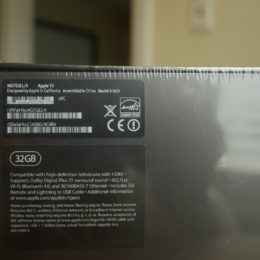
On the back of the fourth generation Apple TV, you’ll notice the 12-digit Serial No. Be sure not to confuse the part number with the serial number. The serial number is at the bottom of the sticker on the back of the Apple TV’s box.

Here’s the serial number from my just-purchased Apple TV 4: C1MQ8G79G9RM

That may seem like a bunch of gibberish, but there’s lots that can be deciphered from that 12-digit number. The two characters that most interest us are the 4th and 5th characters, which are “Q8″ in the example above. The first character represents the year and the second character represents the week. By deciphering the year and week, we can determine when the Apple TV was manufactured.

Fortunately, some smart folks have already created a script so that we don’t have to go about figuring out the manufactured date in our heads. Simply visit the link and enter a valid Apple TV serial number.

The script makes it easy, and takes the guess work out of translating weeks to months. Here are the results from my recent query:

  • Family name: MGY52
  • Group1: AppleTV
  • Group2:
  • Generation: 4
  • Production week : -34- (August)
  • Production year : -2015-
  • Model introduced: -0-
  • Capacity: 32GB
  • Memory – flavour: xx
  • Factory: C1

As you can see, the Apple TV that I purchased was produced in…

https://9to5mac.com/2016/03/14/prepare-apple-tv-jailbreak-tvos-9-0-usb-c-cable/
AppleTV 4 Jailbreak (appletv4jailbreak.com)


Apple TV 2 won’t jail break – AppleTV 4 Jailbreak (appletv4jailbreak.com)

I had a unit i bought mid last year from someone who updated it to ios5 and i was unable to jailbreak it even after the iOS5 jailbreak was released. I was finally able to jailbreak it a couple days ago by updating it without iTunes (using the built in update feature in the settings tab) and then connecting it to seas0npass. I was shocked to see it jailbreak as every attempt before had failed. For some reason the ota update seemed to fix whatever problems it had before.


https://forums.macrumors.com/threads/apple-tv-2-wont-jail-break-please-help.1520293/
AppleTV 4 Jailbreak (appletv4jailbreak.com)


AMD Link now lets you stream your PC games to Android TV and Apple TV – AppleTV 4 Jailbreak (appletv4jailbreak.com)

When the AMD Link app launched way back in 2017, it was a pretty limited experience, merely allowing you to monitor your PC’s resource utilization and other statistics remotely. Once it picked up the ability to stream games, à la Nvidia GameStream, Moonlight or Steam Link, AMD GPU owners started getting antsy for a way to bring the experience onto their TVs. Luckily for them, the AMD Link app has come to both Android TV and Apple TV.

This new platform support appears to have arrived within the last couple of days without fanfare or announcement. AMD silently updated its AMD Link page to mention Android TV and Apple TV within the last week according to the internet archive, paired with a similar update to the text of its Play Store app listing. A new Android TV-specific version of the Android app was also spotted over at our sister site APK Mirror, and a recent update to the Radeon Adrenalin software mentions new support for connections to Apple TV and Android TV devices.

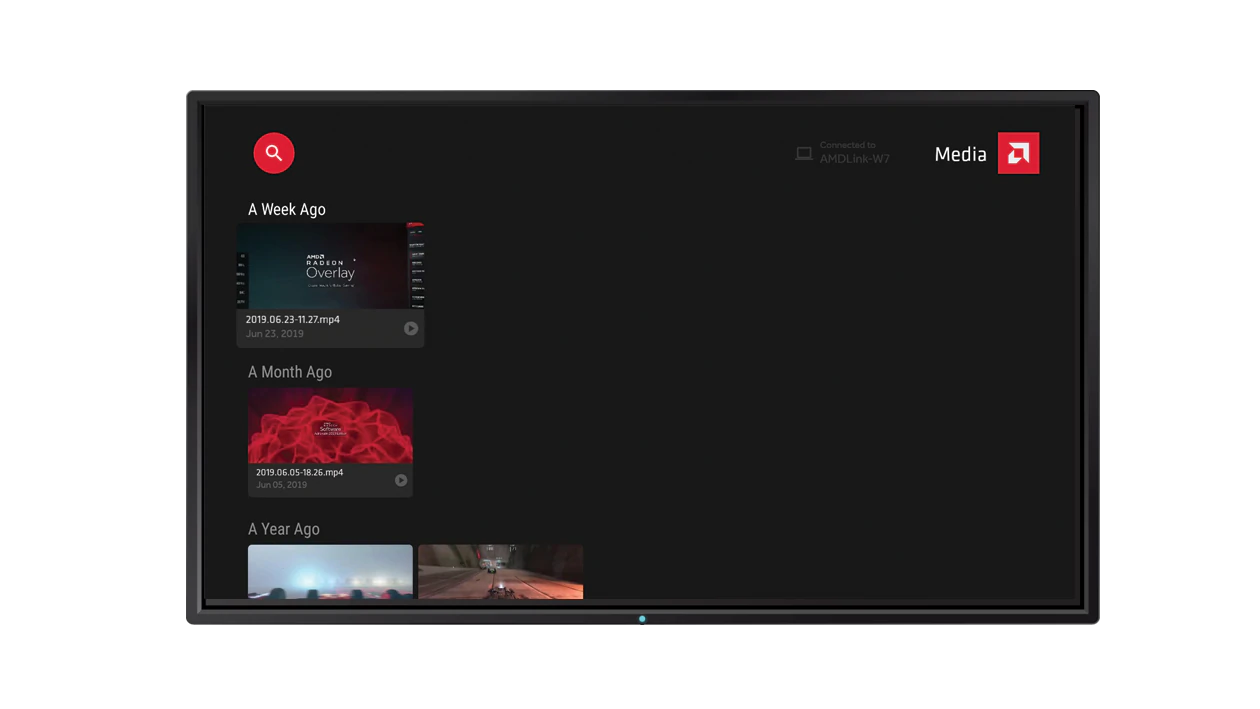
The app listing states there are three main sections when used from a TV:

• Connect section: connect to your PC quickly and easily to get AMD Link for your Smart TV started
• Gaming section: Launch your PC games and stream them to your Smart TV, or view recent media
• Media section: playback gameplay moments saved on your PC

While we can’t give it a try for ourselves (none of us at AP has an AMD GPU) we were able to install the app onto an Android TV device, and it appears to work — or, at least, the app is genuinely compatible with the platform.

Interested AMD GPU owners with Android or Apple TV devices can pull down the AMD Link app over on the Play Store and Apple App Store and enjoy some big screen living room streaming for themselves. If Android TV users run into any issues (Android TV app listings can have odd device compatibility), the Android TV version is also available over on APK Mirror.

AMD Link

Developer: AMD (Advanced Micro Devices, Inc.)

Price: Free

https://www.androidpolice.com/2019/07/12/amd-link-now-lets-you-stream-your-pc-games-to-android-tv-and-apple-tv/
AppleTV 4 Jailbreak (appletv4jailbreak.com)


Apple Says Apple TV Plus One-Year Free Offer Won’t Have ‘Material Impact’ on Earnings, Disputing Analyst Prediction – AppleTV 4 Jailbreak (appletv4jailbreak.com)

Apple is giving away one year free of the Apple TV Plus streaming service to customers who buy one of its devices starting in November — but the company insists the offer won’t have a “material impact” on earnings, contrary to a prediction from a prominent Wall Street analyst.

“We do not expect the introduction of Apple TV+, including the accounting treatment for the service, to have a material impact on our financial results,” the tech giant said in a statement to CNBC.

The company was responding to a downgrade of its stock by Goldman Sachs, which predicted the one-year-free Apple TV Plus offer would depress earnings per share for the December 2019 quarter by 16%.

Apple’s share fell as much as 2.7% Friday after Goldman Sachs cut its 12-month price target on Apple’s stock from $187 to $165 per share, citing the firm’s expectation that the free Apple TV Plus offer would have a “material negative impact” on earnings. The stock rebounded slightly after Apple’s statement, closing down 1.9% to $218.75 per share on Sept. 13.

In a research note, Goldman Sachs analyst Rod Hall said he expected Apple to account for the one-year free trial of Apple TV Plus as a discount of about $60 (which would be the retail cost of Apple TV Plus for one year) in the hardware segment.

Related Stories

“Effectively, Apple’s method of accounting moves revenue from hardware to services even though customers do not perceive themselves to be paying for [Apple] TV+,” Hall wrote in the note, released late Thursday. The analyst cited Apple’s previous accounting methods for services like Apple Maps and the Siri voice assistant, which are included with its hardware products.

Earlier this week, Apple announced that Apple TV Plus will launch Nov. 1 in over 100 countries and regions, priced at $4.99 per month (with a seven-day free trial) for existing customers and free for 12 months with the purchase of any iPhone, iPad, Apple TV, iPod touch or Mac.

Apple is premiering nine original shows on Apple TV Plus when the service launches, including “The Morning Show,” a drama starring and executive produced by Reese Witherspoon and Jennifer Aniston, and starring Steve Carell; “See,” a drama starring Jason Momoa and Alfre Woodard, set 600 years in the future after a virus has decimated humanity; and “For All Mankind,” an alternate-history series from Ronald D. Moore about the space race.

0 Comments

https://variety.com/2019/digital/news/apple-tv-plus-one-year-free-offer-earnings-dispute-analyst-1203335252/
AppleTV 4 Jailbreak (appletv4jailbreak.com)


How-To: Prepare for the Apple TV 4 jailbreak – AppleTV 4 Jailbreak (appletv4jailbreak.com)

Last week, it was revealed that an Apple TV 4 jailbreak is scheduled to be released in the very near future. That’s great, but the news comes with an asterisk: the jailbreak will only work with devices running tvOS 9.0 or 9.0.1. If you’ve updated to tvOS 9.1, 9.1.1 or any of the new betas releases, there’s no way to downgrade back to 9.0 or 9.0.1.

Thankfully, there are still plenty of fourth generation Apple TVs available in the wild that come installed with one of the first two versions of tvOS. In fact, in preparation for the upcoming jailbreak, I was able to easily purchase a new Apple TV running tvOS 9.0. 

Check your current Apple TV 4

Before running out to buy a new Apple TV, check the one you own first. Go to Settings → General → About and look for the tvOS version. If it’s anything higher than 9.0.1, you’ll need to purchase a new Apple TV in order to jailbreak. Of course, this is only true if you wish to jailbreak on day one. You could opt to be patient and wait for an updated jailbreak that works with newer versions of tvOS, but that takes patience and there’s no guarantee that’ll ever happen.

How to decipher an Apple TV 4 serial number

I find that going to the store and purchasing an Apple TV 4 is the best option. You could do it online, but if you do it in store, you’ll have the peace of mind of being able to check the serial number of the Apple TV before purchasing.

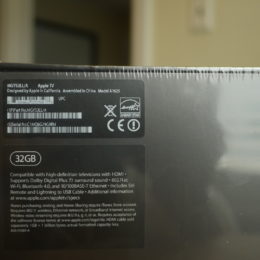
On the back of the fourth generation Apple TV, you’ll notice the 12-digit Serial No. Be sure not to confuse the part number with the serial number. The serial number is at the bottom of the sticker on the back of the Apple TV’s box.

Here’s the serial number from my just-purchased Apple TV 4: C1MQ8G79G9RM

That may seem like a bunch of gibberish, but there’s lots that can be deciphered from that 12-digit number. The two characters that most interest us are the 4th and 5th characters, which are “Q8″ in the example above. The first character represents the year and the second character represents the week. By deciphering the year and week, we can determine when the Apple TV was manufactured.

Fortunately, some smart folks have already created a script so that we don’t have to go about figuring out the manufactured date in our heads. Simply visit the link and enter a valid Apple TV serial number.

The script makes it easy, and takes the guess work out of translating weeks to months. Here are the results from my recent query:

  • Family name: MGY52
  • Group1: AppleTV
  • Group2:
  • Generation: 4
  • Production week : -34- (August)
  • Production year : -2015-
  • Model introduced: -0-
  • Capacity: 32GB
  • Memory – flavour: xx
  • Factory: C1

As you can see, the Apple TV that I purchased was produced in…

https://9to5mac.com/2016/03/14/prepare-apple-tv-jailbreak-tvos-9-0-usb-c-cable/
AppleTV 4 Jailbreak (appletv4jailbreak.com)


Apple TV 4K review: A long-awaited boost to the streamer – AppleTV 4 Jailbreak (appletv4jailbreak.com)
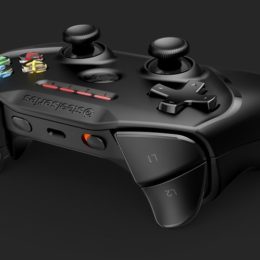
A lot can happen in a couple of years. Whole industries can shift, evolve, or even die.

Since the last Apple TV launch – which was all about games – we’ve seen an increasing transition to 4K and high dynamic range (HDR) content. 

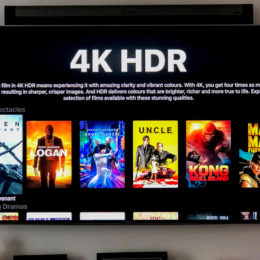
The Apple TV 4K jumps aboard that ultra high-definition (UHD) and high dynamic range (HDR) train, seeing Apple get back to delivering what the original Apple TV first promised: an easy and affordable way of watching movies and TV shows on your television.

With so many other ways to consume such content, however, does the Apple TV 4K have a hard sell for the mass market – or does its affordable approach to 4K content put a big enough oar in to disrupt the market for the better?

1/5Pocket-lint

  • Same design as last model
  • Remote included, with Siri voice control
  • iPhone/iPad control

So many Apple reviews start the same: the design hasn’t changed, but the insides have. That’s the same with the Apple TV 4K, which takes on the same form factor and design as the previous Apple TV. “If it ain’t broke then why fix it?” as the saying goes. 

Visually speaking, the black box of Apple TV 4K isn’t especially inspiring – but as with so much under-the-telly AV kit, it’s happy to be hidden away, out of sight.

Even when not in view, the included small touch-sensitive remote is easy to use, if you don’t want to use your phone or tablet to control the box.

That remote is easy to use, features all the relevant buttons and a touch sensitive panel on the top for gesture controlling your way through the Apple TV menu system. There’s a small cosmetic change compared to the older model – a white circle around the menu button and this circle is supposed to act as a focus for when in lower lighting conditions. It doesn’t really make any difference. 

1/5Pocket-lint

  • Dolby Vision and HDR10 support at 60fps
  • Faster A10 processor (as found in iPhone 7 / 7 Plus)
  • 32/64GB storage options

Of course, design is only one side of the story, and here Apple hasn’t held back in giving the Apple TV enough power to get things done. The Apple TV 4K uses the powerful A10 Fusion chip (as found in the iPhone 7 and 7 Plus) and for those interested, that doubles the performance and packs in four times the graphical capabilities compared to the outgoing Apple TV this model replaces. 

That power is mostly used to deliver a set-top box that is capable of delivering 4K HDR/Dolby Vision quality movies, although it’s fair to say games and apps load smoothly too.

Also new is support for 4K resolution at 60fps, but you’ll need a compatible cable to cope with the signal, and, of course, a compatible 4K television. Although there are no movies available in 4K 60fps currently – it’s largely Hollywood-style 24fps – the iPhone X and iPhone XS does allow you…

https://www.pocket-lint.com/tv/reviews/apple/142286-apple-tv-4k-review-making-4k-affordable
AppleTV 4 Jailbreak (appletv4jailbreak.com)


Apple TV Games Can Now Force The Use of Game Controllers – AppleTV 4 Jailbreak (appletv4jailbreak.com)
Apple TV game developers can now force players to use a game controller if their title isn’t suitable for the Siri Remote. Until now, all titles have had to be compatible with the Siri Remote, which makes it difficult to play more complex games.

This requirement meant that games that needed various buttons for different actions had to assign them to different areas of the Siri Remote’s touchpad. Players then have to remember what each area is for, and try to ensure they hit it in the right spot.

As you can see in the photo below from TouchArcade, which shows the control system for Modern Combat 5 on tvOS, there are more than five different actions assigned to that tiny touchpad. This delivers a poor in-game experience.

As a result, tvOS games with control systems like these tend to get bad reviews, because they’re just not fun to play with the Siri Remote. But going forward, developers can force players to use a game controller with physical buttons instead.

“When designing a tvOS game, you may require the use of an MFi game controller, but where possible you should also support the Siri Remote,” Apple’s guidelines read, as highlighted in the tweet below.

That means they don’t have to make their games compatible with the Remote. If they’re just not suitable, they can eliminate it altogether for a greater experience. That means it might be time to invest in a controller if you haven’t already!

[ViaTouchArcade]

http://www.iphonehacks.com/2016/06/apple-tv-games-can-now-force-use-game-controllers.html
AppleTV 4 Jailbreak (appletv4jailbreak.com)



Hulu with Live TV – More than just Live TV – AppleTV 4 Jailbreak (appletv4jailbreak.com)

Stay current with additional news, entertainment, and lifestyle programming from American Heroes Channel, CNBC World, Cooking Channel, Destination America, Discovery Family, Discovery Life, DIY Network, FYI, LMN, and Science.

LEARN MORE →

https://www.hulu.com/live-tv
AppleTV 4 Jailbreak (appletv4jailbreak.com)


How To Jailbreak Your Apple TV 2 – AppleTV 4 Jailbreak (appletv4jailbreak.com)

While rumors continue to circulate about Apple building an HDTV, for now we have the $99 Apple TV set top box. You can get more features and customization on your iDevice by Jailbreaking it, and the same holds true for the Apple TV. Here’s how to do it with Seas0npass.

To jailbreak your Apple TV you’ll need the following.

Note: In this example I’m jailbreaking my Apple TV (2nd Generation) with 5.0.2 firmware on a Windows 7 system. But the process is the same if you’re using a Mac. If your Apple TV is running a different firmware version, just download the appropriate Seas0nPass software, or update your Apple TV to the latest version.

To find which software your Apple TV is running, Go to Settings >> General >> About.

Connect your Apple TV to your Mac or PC with the micro USB cable. Then launch the Seas0npass software.

Click Create IPSW.

Then wait while the new Firmware is downloaded to your system. The amount of time it takes will vary depending on the speed of your Internet connection.

Next it will start to install the software.

After it’s done, you’ll see the following screen. On your Apple TV remote, hold down both the Menu and Play/Pause buttons for seven seconds. This puts your Apple TV in DFU mode.

After the Custom IPSW is created successfully, iTunes will open and your Apple TV will be restored to the new firmware.

The process takes five to ten minutes. When it’s done you’ll get the following message. Click OK and unplug your Apple TV from your computer.

Connect your Apple TV back to your HDTV and you’ll need to go through the initial set up process again.

When it boots up, you’ll see the Firecore logo for the Settings icon. This reaffirms the jailbreak was successful.

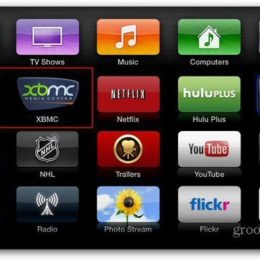
After jailbreaking your Apple TV  you can add extra apps and customization to it that aren’t available like NitoTV, XBMC, PLEX and more. I’ll be covering the groovy features you can add in future articles.

https://www.groovypost.com/howto/jailbreak-apple-tv-2/
AppleTV 4 Jailbreak (appletv4jailbreak.com)


Apple TV 4 / 4K Jailbreak Released – Download LiberTV Jailbreak – AppleTV 4 Jailbreak (appletv4jailbreak.com)

HomeApple TV Jailbreak › Apple TV 4 / 4K Jailbreak Released – Download LiberTV Jailbreak

Good news for Apple TV users, Apple TV 4 & 4K jailbreak has released for the public. Famous iOS researcher, Jonathan Levin released a new LiberTV jailbreak solution to tvOS 11.0 / 11.1. Here’s all you need to know how to download & liberating your Apple TV.

New LiberTV 11 supports to jailbreak Apple TV 4 and AppleTV 4K, the  latest version. Also it compatible with TvOS 11 and tvOS 11.1 to jailbreak but not supports to tvOS 11.2 jailbreak at the time.

Developer, Jonatha Levin already has released his LiberTV 10 solution to jailbreak Apple TV 4 on tvOS 10 – 10.1 few months ago. And, he is ready to release jailbreak for iOS 11 soon.

Apple TV 4 / 4K Jailbreak Download


Apple TV 4 Jailbreak Instructions for users

  • LiberTV 11 is only support for tvOS 11.0 – 10.1 on Apple TV 4 and Apple TV 4K now, tvOS 11.2 users need to wait until this tool to update.
  • Users need to use a Window or MAC computer to jailbreak process.
  • This jailbreak process is like IPA file installer method. You can jailbreak Apple TV with Cydia Impactor successfully.

How to jailbreak your Apple TV 4 / 4K on tvOS 11 – 11.1

  • Download LiberTV 11 IPA file & Cydia Impactor using above download links
  • Please connect your Apple TV in to computer using USB cable
  • Run Cydia Impactor software and drag LiberTV ipa onto Cydia Impactor
  • Then you need to enter Apple ID and Password to continue LiberTV process.
  • Once it complete, you will see LiberTV jailbreak app on your AppleTV interface. Now you can Disconnect your TV from the computer.
  • Open LiberTV app on your AppleTV and hit “Click Me” button to continue jailbreak process
  • Wait and see until complete the jailbreak process. Once it completed successfully you will get another window saying Thank you for using LiberTV. Now you have successfully jailbroken your AppleTV. Click “OK” and enjoy.

More Related News

https://cydiainstaller.net/appletv-4-4k-jailbreak/
AppleTV 4 Jailbreak (appletv4jailbreak.com)


Buy VPN