
You Can Still Get a Free Year of Apple TV+ Even If You’ve Already Subscribed (Here’s How) – AppleTV 4 Jailbreak (appletv4jailbreak.com)
If you’ve already signed up as a paying subscriber to Apple TV+, you’ll be happy to know that you can still take advantage of Apple’s offer of a free year of the service with the purchase of an eligible Apple device.
When Apple officially announced the launch details for Apple TV+ back in September, the company promised that it would offer a year of the service to anybody who purchased certain new Apple devices after Sep. 10. However, it’s significant that Apple never called this a “free trial” of Apple TV+, but simply said that it was giving away a free year of the service.
In other words, unlike traditional free trials, this means that Apple is offering the one year regardless of whether you’re already a subscriber or not. So even if you jumped into an Apple TV+ paid subscription right on Nov. 1, you can still claim your free year of service if you bought a new Apple device after that.
So if you picked up a new iPhone or Apple TV during Black Friday, or you’re planning to put an iPad or MacBook under the tree, it will still include a free year of Apple’s streaming service.
The especially good news is that you don’t have to try and finagle the free year out of Apple by doing things like cancelling your existing subscription and signing up again.
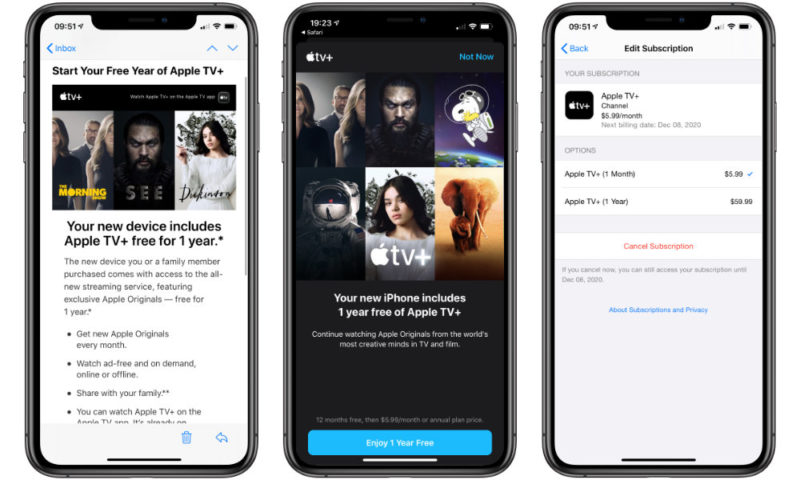
Although there’s no obvious way to initiate the free year once you’re already a subscriber, after you’ve set up and registered your new Apple device with your Apple ID, an email should arrive within a few days offering you the free trial.
- Wait for the Start Your Free Year of Apple TV+ email to arrive.
- From your iPhone, iPad, or Mac, tap the Start 1 Year Free button in the email. This should open the “TV” app on your device, taking you to a page where you’ll be offered the free trial.
- Tap the Enjoy 1 Year Free button on that page.
- Confirm the “purchase” with Face ID, Touch ID, or your Apple ID password.
After doing this, you should see a confirmation that a free year has been added to your subscription, and your renewal date has been adjusted accordingly. This means that you won’t lose any time that you already paid for — if you’re on a month-to-month subscription, whatever remains in your current month is still included, and if you’ve already paid for a yearly subscription, your renewal date will be pushed off into 2021 — following the end of the year you’ve already paid for.
For example, in our case we were offered the free trial on Dec. 4 (following the purchase of a new iPhone 11 Pro Max on Nov. 28), but like everyone else who signed up for Apple TV+ immediately on Nov. 1, our renewal date lands on the 8th of the month — the day after the seven-day free trial ended. Hence, after adding the free one year, our Apple TV+ service will next be billed on Dec. 8, 2020.
So even…
https://www.idropnews.com/news/you-can-still-get-a-free-year-of-apple-tv-even-if-youve-already-subscribed-heres-how/124498/
AppleTV 4 Jailbreak (appletv4jailbreak.com)
